
How to fix KB5121003 errors in Windows 11?
KB5121003 won't install, crashes games (inpoutx64), hangs at the HP logo (0x800f0845) or asks for BitLocker? Match your symptom: 8 fixes, checked Oct 2026.

Prefer to fix it yourself? The manual steps follow.
- Methods
- 8
- Time
- 10 minutes
- Level
- Intermediate
- Applies to
- Windows 11
8 methods in this guide
- KB5121003 at a glance
- KB5121003 problems: match your symptom
- Why KB5121003 causes errors
- Disable the inpoutx64 driver if games crash or the PC restarts while playing
- Install the newest cumulative update instead of KB5121003
- Install hangs at the HP logo and rolls back with 0x800f0845
- Repair Windows Update and system files
- Download KB5121003 (or a newer update) from the Microsoft Update Catalog
- Get past BitLocker recovery or a PC that will not start
- Teams or the new Outlook will not open on an ARM PC
- Uninstall KB5121003 as a last resort
- How to avoid update errors next time
- Frequently asked questions
- Sources
KB5121003 is the August 11, 2026 security update for Windows 11 24H2 and 25H2, and most errors after it come from four causes: the third-party inpoutx64.sys driver crashing games, a failed or rolled-back install, a BitLocker recovery prompt at startup, or Teams and the new Outlook not opening on ARM PCs. Find your symptom in the table below and use the matching fix; if the update itself will not install, skip it and install the newest cumulative update, which replaces it.
Checked October 3, 2026 against Microsoft's release notes, Windows release health and the Microsoft Update Catalog.
KB5121003 at a glance
| Released | August 11, 2026 (August Patch Tuesday), with servicing stack update KB5123304 |
|---|---|
| Applies to | Windows 11 24H2 (build 26100.9168) and 25H2 (build 26200.9168). Windows 11 23H2 got KB5120240 instead. |
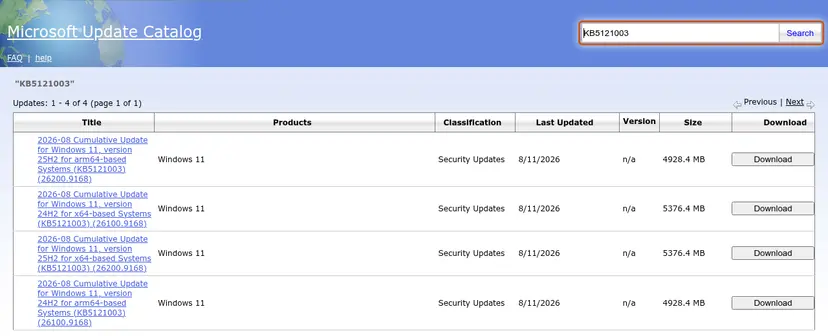
| Download size | 5376.4 MB for x64, 4928.4 MB for arm64 (Microsoft Update Catalog) |
| Replaced by | KB5124008 (September 8, 2026, build .9445), KB5129195 (September 14, out-of-band) and the KB5124010 preview (September 22, build .9550). Any of them includes KB5121003. |
| Known issues listed by Microsoft | Games crashing with the inpoutx64 driver (resolved by a driver block), Teams and new Outlook failing on ARM PCs (resolved in September updates) |
| Reported by users, not listed by Microsoft | Install hangs at the HP logo with 0x800f0845, BitLocker recovery after restart, Windows Hello PIN lost after each restart, power disconnects on Lenovo Legion laptops, HDR and refresh-rate changes |
KB5121003 problems: match your symptom
| What you see | Likely cause | Go to |
|---|---|---|
ARC Raiders, THE FINALS or MARVEL Tōkon freezes, closes, shows EXCEPTION_ACCESS_VIOLATION, or the PC restarts during play | RGB lighting driver inpoutx64.sys | Fix 1 |
| KB5121003 keeps failing in Windows Update | Old package; a newer update replaces it | Fix 2 |
Restart hangs at the HP (or other maker) logo, then "Undoing changes" and 0x800f0845 | Firmware settings on some AMD Ryzen AI laptops (user reports) | Fix 3 |
Download or install stops with 0x800f0983, 0x800f0993, 0x80070002 or another code | Damaged update cache or component store, low disk space | Fix 4, then Fix 5 |
| Blue "BitLocker recovery" screen or a restart loop | Boot components and Secure Boot certificates changed | Fix 6 |
| Teams or the new Outlook will not open on a Surface Pro 11, Surface Laptop 7 or other ARM PC | Missing Microsoft Store component update | Fix 7 |
| Anything that makes the PC unusable and nothing else helped | – | Fix 8 |
Why KB5121003 causes errors
- Game crashes and sudden restarts. Microsoft links them to drivers named like
inpoutx64, installed by software for peripherals and internal parts with RGB lighting. Microsoft says the Windows update is not the cause, but the crashes started after it. One affected user found the driver had come with a Razer update tool. - Failed installation. The package is over 5 GB, so a damaged Windows Update cache, a damaged component store or a full system drive stops it. The install also needs up to two restarts because it delivers new Secure Boot certificates; extra restarts during installation are normal.
- Hang at the maker's logo with 0x800f0845. Reported on new HP OmniBook X Flip laptops with AMD Ryzen AI processors and on some Acer, Dell and Lenovo models. HP support told one owner that the BIOS settings were the problem.
- BitLocker recovery. When boot components change, BitLocker can treat the next start as a possible attack and ask for the recovery key. This is a safety check, not data loss.
- Teams and the new Outlook on ARM. A known issue on new or freshly imaged ARM PCs that have not installed Microsoft Store updates yet.
Fix 1: Disable the inpoutx64 driver if games crash or the PC restarts while playing
Microsoft now blocks this driver automatically on home and unmanaged business PCs where ARC Raiders is installed (rolled out from August 26, 2026; a restart is needed, and a message says the driver was disabled). The block is being extended to MARVEL Tōkon, and THE FINALS was fixed by a game update. If you still crash, or IT manages your PC, disable the driver yourself.
- Restart the PC and start the game again. If a message says the driver has been disabled, you are done.
- Check whether the driver is installed. Open Command Prompt and run:
If it says The specified service does not exist as an installed service, this fix does not apply to you; go to Fix 2.sc query inpoutx64
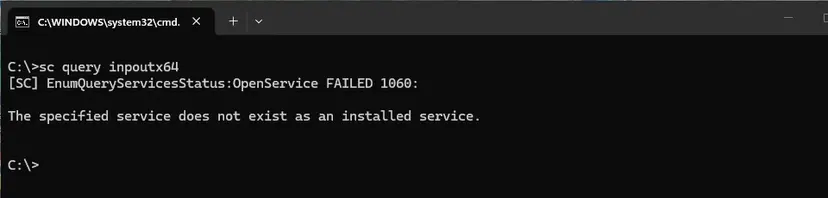
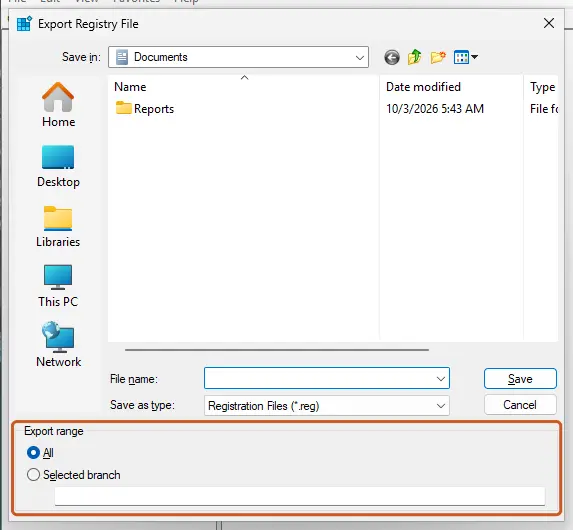
sc query inpoutx64 returns error 1060 and the game crashes have another cause.- If the service exists, back up the registry first: Back up the registry before editing it.
- Press Win + R, type
regeditand press Enter. - Go to
HKEY_LOCAL_MACHINE\SYSTEM\CurrentControlSet\Services\inpoutx64. - Double-click Start, set Value data to
4and click OK. (The same change from an administrator Command Prompt:sc config inpoutx64 start= disabled.) - Restart the PC and start the game.
To undo it, import your registry backup. The RGB software that installed the driver may stop controlling the lighting; check its maker for an update.
Fix 2: Install the newest cumulative update instead of KB5121003
Every later monthly update contains KB5121003, so do not keep retrying the August package.
- Open Settings > Windows Update and click Check for updates.
- Install the newest cumulative update offered (KB5124008 or later; the next Patch Tuesday is October 13, 2026) and restart.
- If Windows Update offers only KB5121003 and it fails, note the error code under the update and go to Fix 4.
Fix 3: Install hangs at the HP logo and rolls back with 0x800f0845
This pattern is reported mostly on new HP OmniBook X Flip laptops with AMD Ryzen AI 5 430 processors: the update downloads, the restart stops at the logo, and after a forced shutdown Windows undoes the changes. The workaround that worked for owners came from HP support.
- Shut the laptop down. Press the power button and tap F10 until the BIOS setup opens.
- Press F9 to load the default settings and confirm with Yes.
- Press F10 and confirm with Yes to save and exit.
- In Windows, install the newest cumulative update (Fix 2) rather than KB5121003. One owner reported that the August 27 preview KB5120998 installed and cleared KB5121003 from the queue.
- Also install the newest BIOS from HP Support Assistant or HP's support site. On other brands, update the BIOS from the maker's site; keys differ by maker.
Loading BIOS defaults can change the boot or BitLocker state. Have your BitLocker recovery key ready first (see Fix 6).
Fix 4: Repair Windows Update and system files
- Make sure drive C: has at least 20 GB free: Free up disk space and delete temporary files.
- Run the Windows Update troubleshooter: Run the Windows Update troubleshooter.
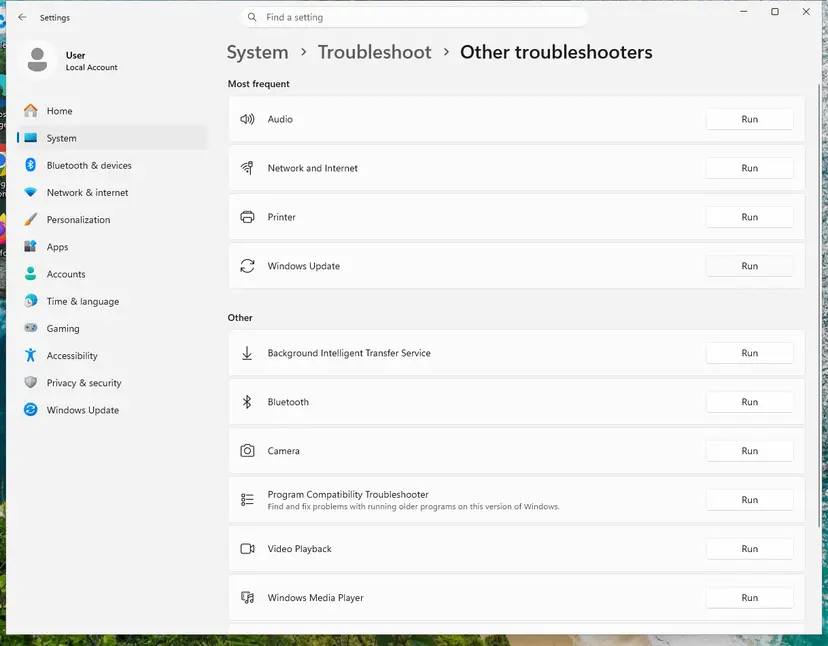
- For
0x800f0983,0x800f0993and other errors about missing or damaged components, repair the component store and system files: Run DISM and SFC to repair Windows system files.
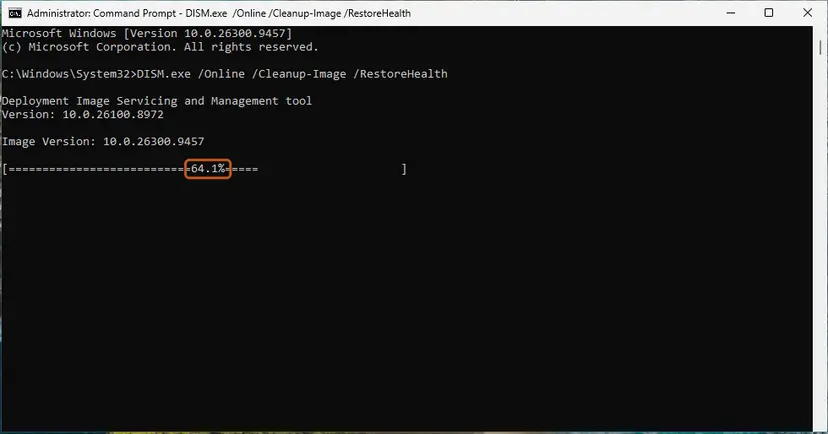
- If the download fails or stops at the same percentage, clear the update cache: Reset Windows Update components.
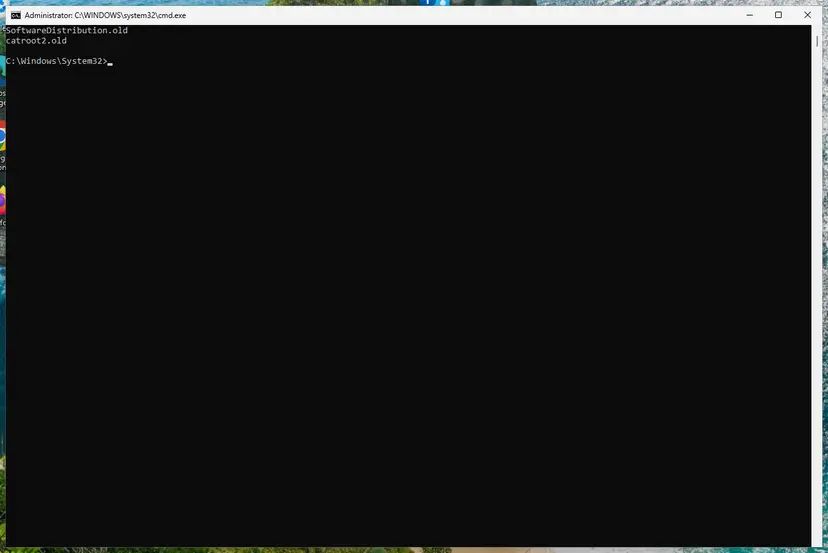
- Restart and check for updates again. If it still fails, install it manually (Fix 5).
Fix 5: Download KB5121003 (or a newer update) from the Microsoft Update Catalog
- Check your version and processor type: press Win + R, type
winverand press Enter.
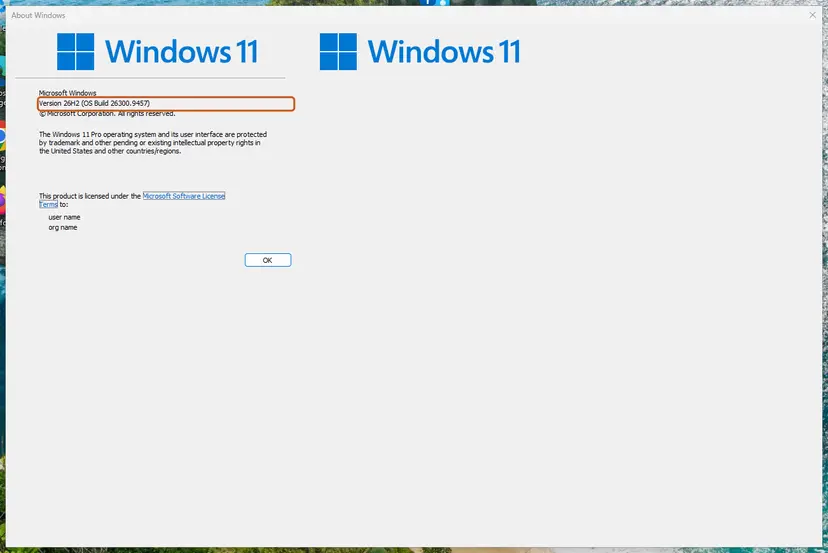
- Follow Install an update from the Microsoft Update Catalog and search the catalog for
KB5121003or, better, the newest cumulative update. - Download the package for your version and processor (x64 or arm64). Download every .msu file the catalog lists for that package. Microsoft's notes say KB5121003 can also need the checkpoint package
windows11.0-kb5043080if your PC does not have it yet. - Put all downloaded .msu files in one folder, for example
C:\Packages, and install from an administrator Command Prompt so DISM finds the prerequisite by itself:
Use the exact file name you downloaded (ARM64 file names differ).DISM /Online /Add-Package /PackagePath:C:\Packages\windows11.0-kb5121003-x64_dc58f03fef04b4c611e0db0ab3fadfb301194113.msu - Restart when asked. Up to two restarts are normal.
Fix 6: Get past BitLocker recovery or a PC that will not start
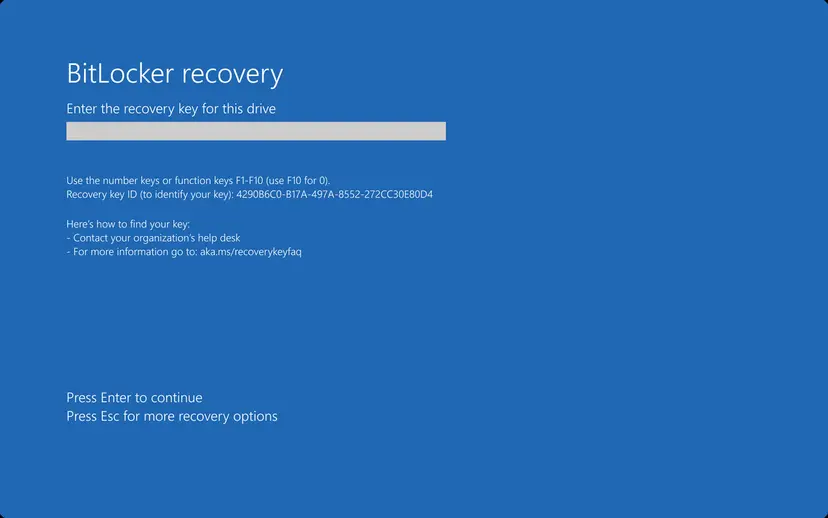
- On another device, sign in at
aka.ms/myrecoverykeywith the Microsoft account used on the PC and find the key whose ID matches the one on the screen. Work or school PCs: ask IT. - Type the 48-digit key (use F1–F10 if the number keys do not work; F10 is 0) and press Enter. Windows usually starts and does not ask again.
- If the PC returns to the recovery screen or keeps restarting, press Esc for more recovery options, or let the recovery environment open after two or three failed starts. Then choose Troubleshoot > Advanced options > Uninstall Updates > Uninstall latest quality update. You may need the key again.
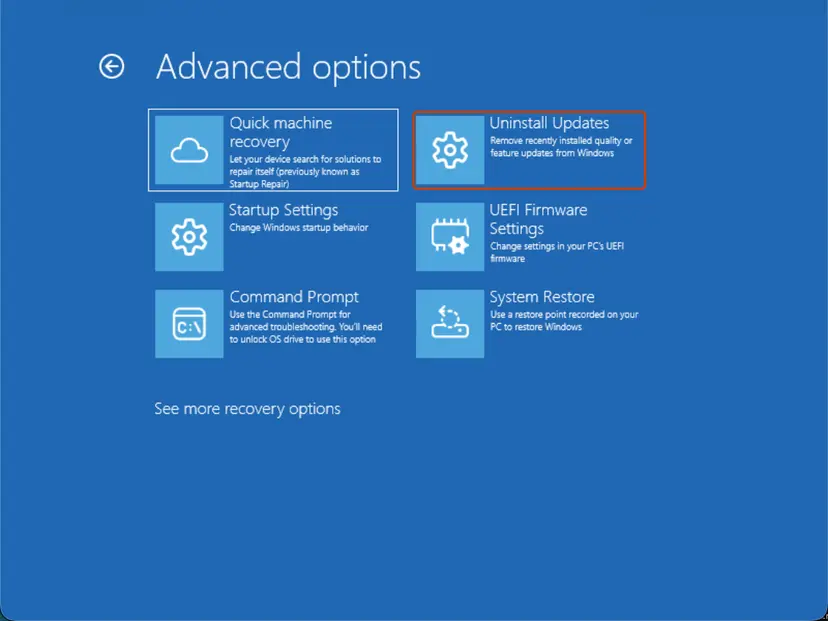
- If Windows still does not start: Run Startup Repair.
- Once Windows starts, install the newest BIOS/UEFI firmware from your PC maker before you install updates again.
Do not turn off Secure Boot to push the update through. It does not fix the cause, and on a BitLocker-protected PC it triggers another recovery prompt.
Fix 7: Teams or the new Outlook will not open on an ARM PC
- Open Microsoft Store and select Downloads (the Updates & downloads page).
- Click Check for updates and install everything, including the Auto Super Resolution Package 1.0.19.0 or later.
- Restart and open Teams or Outlook. Classic Outlook, Word and Excel are not affected.
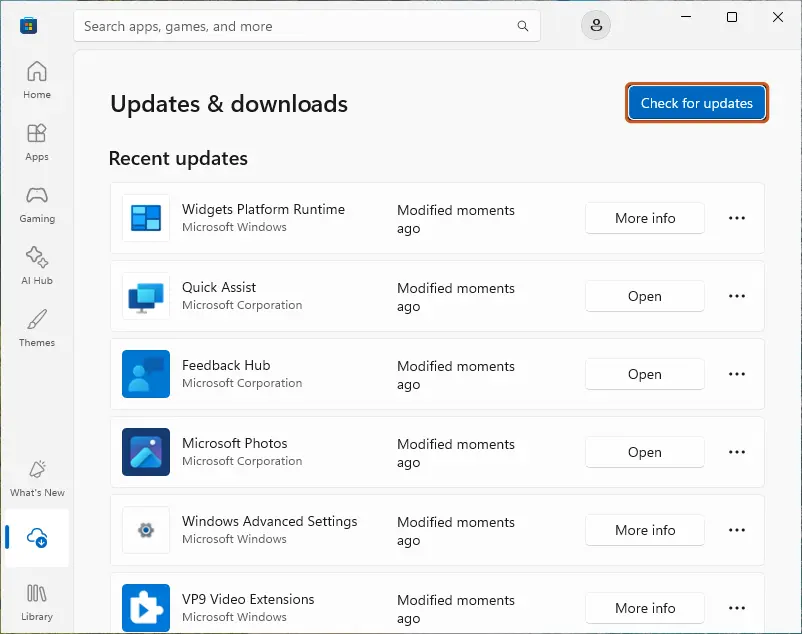
Windows updates released on and after September 8, 2026 also fix this, so Fix 2 works too.
Fix 8: Uninstall KB5121003 as a last resort
KB5121003 fixes about 400 security vulnerabilities, so remove it only if the PC is unusable, and install the next update as soon as you can.
- Open Settings > Windows Update > Update history.
- Scroll down and click Uninstall updates.
- Find Security Update for Microsoft Windows (KB5121003) and click Uninstall.
- Restart the PC.
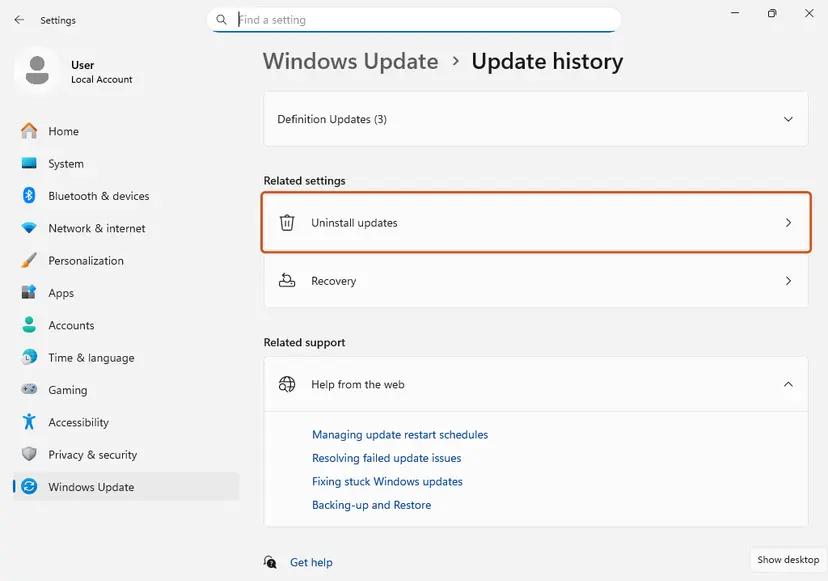
If Windows does not start, use Uninstall Updates in the recovery environment as in Fix 6.
How to avoid update errors next time
- Keep 20 GB or more free on drive C: before Patch Tuesday (the second Tuesday of the month).
- Save your BitLocker recovery key somewhere other than the PC before firmware or Secure Boot updates.
- Update the BIOS and the RGB, peripheral and anti-cheat software from their makers; old kernel drivers like inpoutx64 cause most post-update crashes.
- If an update causes trouble, pause updates for a week in Settings > Windows Update instead of uninstalling, and install the fixed update when it arrives.
- Windows 11 24H2 Home and Pro stop getting security updates on October 13, 2026. Move to 25H2 or 26H2 through Settings > Windows Update.
Frequently asked questions
How do I download KB5121003?
Windows Update installs it automatically. For a manual install, search KB5121003 in the Microsoft Update Catalog and pick the package for your version (24H2 or 25H2) and processor (x64 or arm64), as in Fix 5. Since September 8, 2026, downloading the newest cumulative update is the better choice because it already includes KB5121003.
How big is KB5121003?
5376.4 MB for x64 PCs and 4928.4 MB for arm64 PCs in the Microsoft Update Catalog. Windows Update usually downloads less because it fetches only the changed parts.
Are there performance issues with KB5121003?
Microsoft lists two known issues: game crashes with the inpoutx64 driver (Fix 1) and Teams and Outlook failures on ARM PCs (Fix 7). Users have also reported HDR and refresh-rate changes, random AC power disconnects on Lenovo Legion laptops (Kernel-Power event 105), and Windows Hello asking to set up the PIN after every restart. Microsoft has not confirmed these. Install the newest cumulative update and the newest drivers and BIOS first; uninstall KB5121003 (Fix 8) only if the PC is unusable.
Should Delivery Optimization be turned off?
It is not needed to fix KB5121003. Delivery Optimization only decides whether parts of updates come from other PCs. If a download stalls, you can turn off Allow downloads from other devices in Settings > Windows Update > Advanced options > Delivery Optimization and try again; it does not fix install errors.
What are the problems with the latest Windows 11 update?
KB5121003 is no longer the latest. The September 8, 2026 update (KB5124008) fixed the ARM Teams and Outlook issue, and an out-of-band update (KB5129195) followed on September 14. Check Microsoft's Windows release health page for issues in the newest update before you install it.
Windows Security says virus protection is turned off after KB5121003. Is my PC infected?
Users have reported this warning after the update while Microsoft Defender kept running; Microsoft has not listed it as a known issue. Open Windows Security > Virus & threat protection. If Real-time protection is on and no other antivirus replaced Defender, the warning is a status error. Install the newest cumulative update. If protection really is off, turn it back on and run a full scan.
What is error 0xc0430001 with KB5121003?
It applies to installation media, not to Windows Update. Microsoft says media updated with this month's packages must include the boot.stl file used for Secure Boot validation; without it, the PC cannot start from the media and shows 0xc0430001. Recreate the media with Microsoft's Update WinPE script or copy boot.stl from Windows\Boot\EFI on a working PC with the same version.
Is KB5121003 available for Windows 10?
No. KB5121003 is for Windows 11 24H2 and 25H2 only. In August 2026 Windows 11 23H2 received KB5120240 and Windows 10 PCs enrolled in Extended Security Updates received KB5120249.
Sources
- Microsoft Support: August 11, 2026—KB5121003 (OS Builds 26200.9168 and 26100.9168), read October 3, 2026.
- Windows release health: Resolved issues in Windows 11, version 25H2 (inpoutx64 entry), read October 3, 2026.
- Windows release health: Windows 11 release information (update list, end of servicing dates), read October 3, 2026.
- Microsoft Update Catalog: search results for KB5121003, read October 3, 2026.
- Microsoft Learn: BitLocker recovery overview, read October 3, 2026.
- Microsoft Q&A: "2026-08 Security Update (KB5121003) (26200.9168) not installing" (HP OmniBook, 0x800f0845), read October 3, 2026.
Sources
- windowslatest.com/2026/08/14/microsoft-install-windows-11s-august-2026-update-within-3-days-400-security-bugs-fixed
- pcworld.com/article/3165886/windows-11-update-causes-chaos-pcs-wont-start-up-or-get-stuck-on-the-bitlocker-screen.html
- cyberupdates365.com/windows-11-update-error-august-2026-fix
- support.microsoft.com/en-us/servicing/os/windows-11/2026/08/kb5121003-windows-11-24h2-25h2-security-update
- windowslatest.com/2026/08/11/i-tested-windows-11-august-2026-update-heres-everything-new-improved-and-fixed
Did this fix work?
One click, no account. It tells the next reader which guides are worth their time.
Questions and experiences: fix KB5121003 errors in Windows 11
Still broken, or found a fix we did not cover? Ask here: members and our editors answer. Reading is open; writing needs a free account.
…