
Stop background apps in Windows 11 and 10
Background apps can sync, send notifications and use battery while you do not use them. You can stop them one by one.
- Time
- 1 minute per app
- Level
- Easy
Windows 11
Steps written for Windows 11 24H2, 25H2 and 26H2.
Open Installed apps
Open Settings > Apps > Installed apps.
Open the app's advanced options
Find the app, select the three dots (More options) on the right and select Advanced options. If Advanced options is not listed, the app is a desktop app: see below.
Stop background activity
Under Background app permissions, open the Let this app run in background list and select Never. Power optimized (recommended) lets Windows decide; Always keeps the app running.
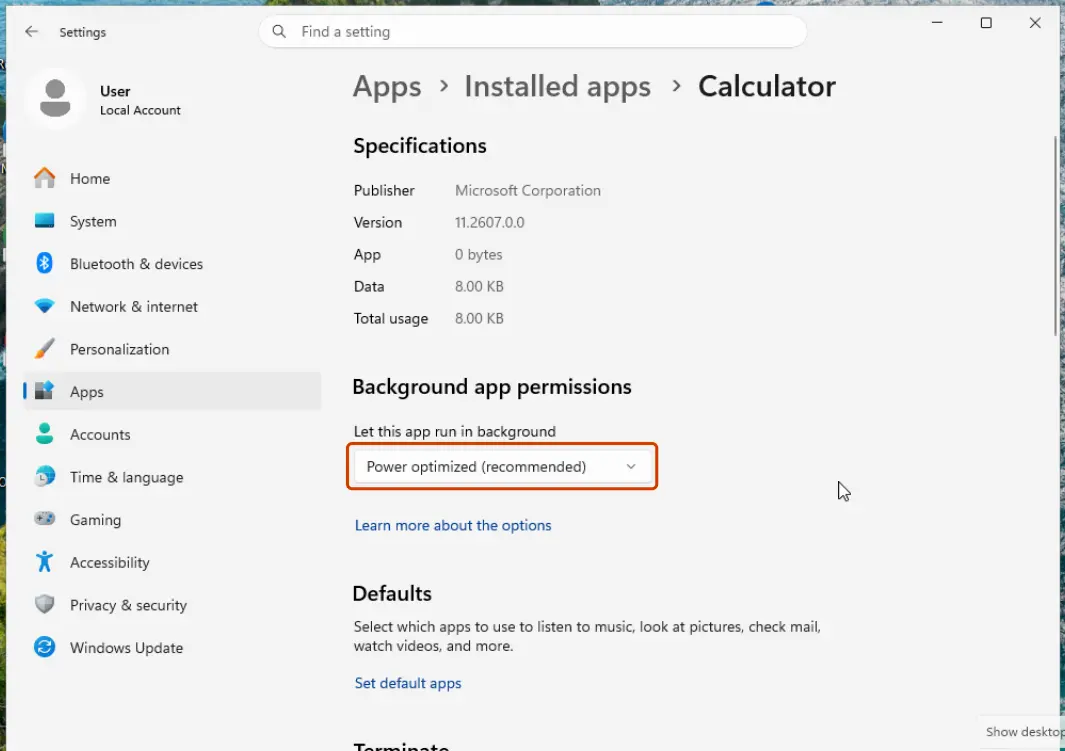
The background setting is in each app's Advanced options. Screenshot: Windows 11 26H2
Windows 10
Steps written for Windows 10 22H2.
Microsoft ended support for Windows 10 on October 14, 2025.
Open Background apps
Select Start > Settings > Privacy > Background apps.
Turn off single apps
Under Choose which apps can run in the background, turn off the apps you do not need.
Or turn off all of them
To stop most apps at once, turn off Let apps run in the background.
Desktop apps are not in these settings
Programs installed from the internet (.exe installers) do not appear in these settings. Close them from their icon in the notification area, turn off their own "run in background" or "start with Windows" option, or stop them from starting with Windows: Stop apps from opening at startup.
For all users of the PC
On Pro, Enterprise and Education editions, the policy Let Windows apps run in the background under Computer Configuration > Administrative Templates > Windows Components > App Privacy sets this for every account: Open the Local Group Policy Editor.
Used in 1 guide
Sources
- Microsoft Support: Windows background apps and your privacy (read Oct 3, 2026)