
Restore deleted or older files in OneDrive
OneDrive keeps deleted files in its own recycle bin and keeps earlier versions of each file, so a deleted, overwritten or damaged file in your OneDrive folder can usually be brought back without any extra software.
- Time
- A few minutes
- Level
- Easy
- You need
- The Microsoft account (personal, or work or school) the files are stored in. Restoring your whole OneDrive needs a Microsoft 365 subscription on a personal account.
Before you start
- Do not empty the Windows Recycle Bin or the OneDrive recycle bin while you look: a file removed from the OneDrive recycle bin cannot be restored by you.
- Check which account the file was in. A personal account keeps deleted files for 30 days; a work or school account for 93 days unless the administrator changed it.
- Only files that were in your own OneDrive can be restored. A file someone else shared with you has to be restored by its owner.
Deleted files
Steps written for OneDrive on Windows 11 and Windows 10: File Explorer and onedrive.com in any browser.
A file deleted from your OneDrive folder on the PC usually goes to the Windows Recycle Bin and to the OneDrive recycle bin online. Check the PC first, then the web.
Check the Windows Recycle Bin
Double-click Recycle Bin on the desktop. Right-click the file or folder and select Restore. It goes back to its original folder and OneDrive syncs it again. Files that were online-only (cloud icon) when they were deleted do not appear here: continue with the next step.
Open OneDrive on the web
Go to onedrive.com in a browser and sign in with the same account that the OneDrive app on your PC uses.
Open the recycle bin
In the navigation pane on the left, select Recycle bin.
Select what you want back
Point to each file or folder you want and select its round check box.
Restore
Select Restore. The items return to their original folders online and sync back to the OneDrive folder on your PC.
If the file was in Personal Vault
Items deleted from Personal Vault are hidden in the recycle bin. Select Show Personal Vault items in the recycle bin to list them, then restore them the same way.
Older version of a file
Steps written for OneDrive on Windows 11 and Windows 10: File Explorer (OneDrive app signed in) or onedrive.com.
Use this when the file still exists but was overwritten, damaged or encrypted. Microsoft states that OneDrive keeps file version history for 30 days. You can restore one file at a time.
Find the file in your OneDrive folder
Open File Explorer and select OneDrive in the left pane, then go to the file. The OneDrive app must be installed and signed in.
Open Version history
Right-click the file and select Version history. On Windows 11, if it is not in the short menu, select Show more options and look there.
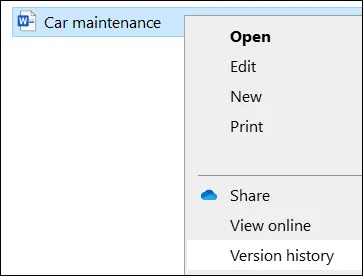
The right-click menu of a OneDrive file in File Explorer with the Version history option. Screenshot: Windows 10 Pick the version
Each saved version is listed with when it was modified. Find the last one from before the file went wrong.
Restore it
Select the three dots (...) next to that version and select Restore. It becomes the current version; the version you replaced stays in the list, so you can switch back.
Or do the same on the web
If the File Explorer option is missing, sign in at onedrive.com, right-click the file and select Version history, then use the three dots (...) next to the version and select Restore.
Restore your whole OneDrive
Steps written for onedrive.com in any browser on Windows 11 and Windows 10; personal accounts need Microsoft 365.
Use this when many files were deleted, renamed or encrypted at once (for example by ransomware or a sync accident). It undoes every change made after the point you choose, within the last 30 days.
Sign in on the web
Go to onedrive.com and sign in. If ransomware was found on the PC, clean the PC first so the restored files are not encrypted again: Ransomware: first steps, finding a decryptor and recovering files On 2-Spyware.
Open the restore page
Personal account with Microsoft 365: select Settings (gear icon) > Options, then Restore your OneDrive in the left pane. Work or school account: select Settings > Restore OneDrive.
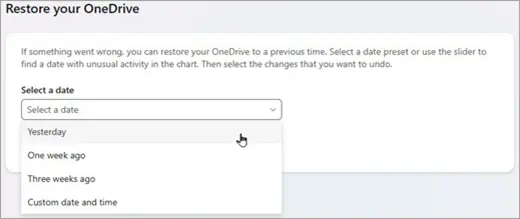
The Restore your OneDrive page with the date presets Yesterday, One week ago, Three weeks ago and Custom date and time. Screenshot: OneDrive on the web Choose a date
Open the date list and select a preset such as Yesterday, or Custom date and time. After automatic ransomware detection, a suggested date is already filled in.
Check what will be undone
Use the daily activity chart to find when the unwanted changes started, and read the activity feed below it. With Custom date and time, select the earliest change you want to undo: every later change is selected with it. Scroll to the top of the feed to see all of them.
Restore
Select Restore. Your OneDrive returns to how it was before the first selected change. Files created after that point are moved to the OneDrive recycle bin, not lost. To reverse the restore, run it again and select the restore action itself.
How long OneDrive keeps things
| What | Personal account | Work or school account |
|---|---|---|
| Deleted files in the OneDrive recycle bin | 30 days | 93 days, unless the administrator changed it |
| Earlier versions of a file | 30 days | 30 days, unless the administrator turned versioning off |
| Restore your whole OneDrive | Last 30 days, Microsoft 365 only | Last 30 days |
If the file is not there
- Removed from the OneDrive recycle bin: Microsoft states that a permanently deleted file cannot be recovered from OneDrive. On a work or school account, deleted recycle bin items go to a second recycle bin that site administrators can see, so ask your IT administrator.
- Shared with you by someone else: only the owner can restore it from their OneDrive.
- Signed in with the wrong account: check the recycle bin of your other Microsoft accounts too, personal and work.
- The file was also stored on the PC: try an earlier version of the folder in Windows (Restore an earlier version of a file or folder) or, as a last step, Windows File Recovery (Recover deleted files with Windows File Recovery). Online-only files were never stored on the PC, so these tools cannot find them.
Next time
OneDrive is a sync service: a file deleted or damaged on the PC is deleted or damaged online too. Keep a second, separate copy of important files: Back up your files (Windows Backup, File History, Time Machine).
Used in 3 guides
Sources
- Microsoft Support: Restore files deleted from your OneDrive (read Oct 3, 2026)
- Microsoft Support: Restore a previous version of a file stored in OneDrive (read Oct 3, 2026)
- Microsoft Support: Restore your OneDrive (read Oct 3, 2026)
- Microsoft Support: Restore items in the recycle bin that were deleted from SharePoint or Teams (read Oct 3, 2026)