
How to update drivers in Windows 11 and 10 (roll back, reinstall)
Device Manager can update a driver, return to the previous one, or remove it so Windows installs it again. Windows Update offers some drivers as optional updates.
- Time
- 5 to 15 minutes
- Level
- Easy
- You need
- An administrator account.
Before you start
- Get drivers from Windows Update or the website of your PC or device maker. Avoid third-party driver updater programs.
- If you are fixing a network adapter, download its driver first: you may be offline after uninstalling it.
Windows 11
Steps written for Windows 11 24H2 and later.
Open Device Manager
Right-click Start and select Device Manager.
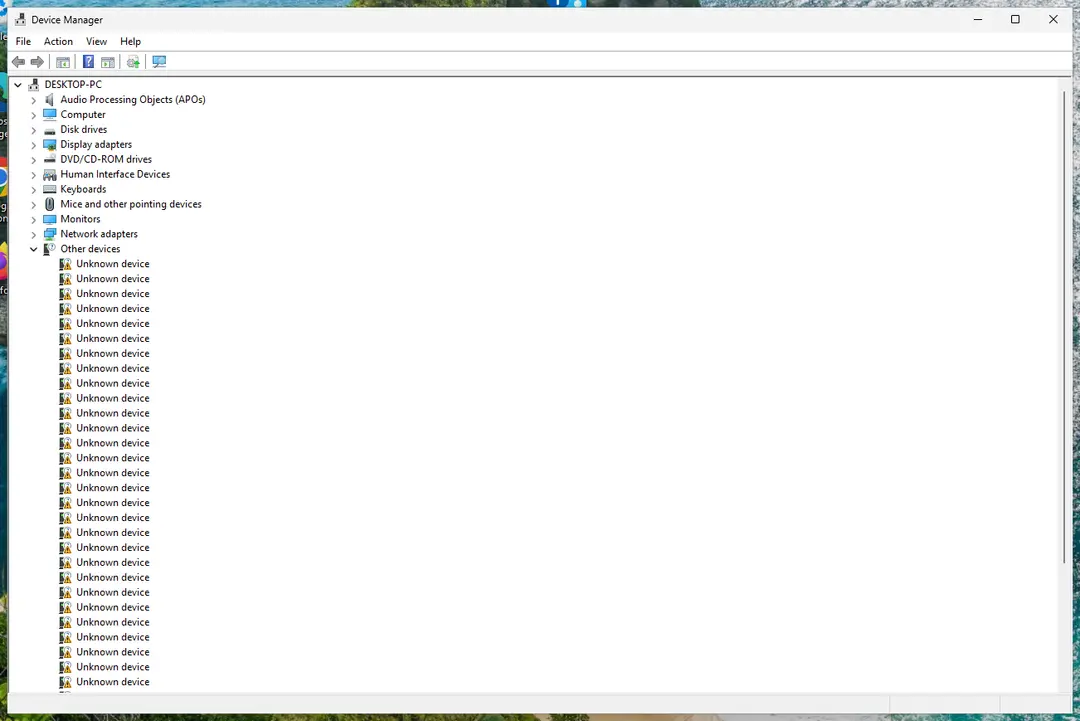
Device Manager lists devices by category; a yellow warning sign marks a device with a problem. Screenshot: Windows 11 26H2 Open the device's Driver tab
Expand the category (for example Display adapters), right-click the device, select Properties and open the Driver tab. Driver Date and Driver Version show what is installed now.
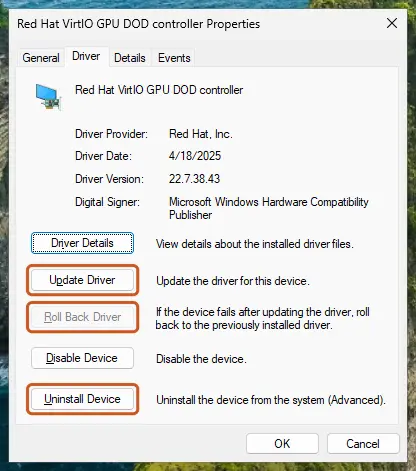
The Driver tab holds all three actions: update, roll back, uninstall. Screenshot: Windows 11 26H2 Update the driver
Select Update Driver and let Windows search automatically. To use a driver you downloaded from the device maker, select Browse my computer for drivers instead and point to the unpacked folder.
Or roll back the driver
If the problem started after a driver update, select Roll Back Driver, choose a reason and select Yes. The button is greyed out when Windows has no earlier driver to return to.
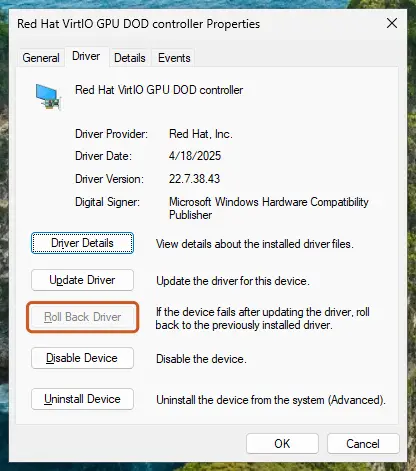
Roll Back Driver is greyed out here because there is no earlier driver. Screenshot: Windows 11 26H2 Or reinstall the driver
Select Uninstall Device. Tick Attempt to remove the driver for this device only if you want Windows to delete the driver package too, then select Uninstall.
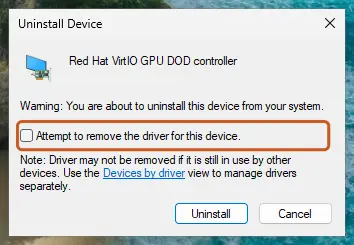
Tick the checkbox only to delete the driver package as well. Screenshot: Windows 11 26H2 Restart
Restart the PC. Windows detects the device again and installs a driver for it.
Check optional driver updates
Open Settings > Windows Update > Advanced options > Optional updates. If driver updates are listed, tick the ones you need and select Download & install.
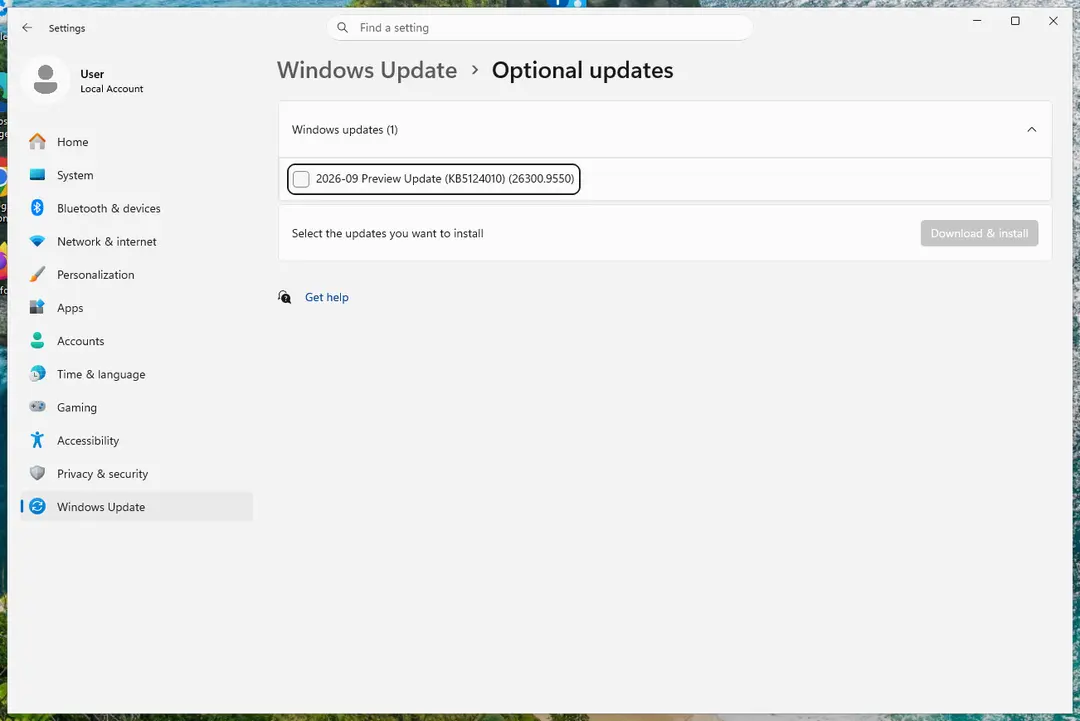
Optional updates on our test PC; driver updates appear here when Windows Update has any for your hardware. Screenshot: Windows 11 26H2
Windows 10
Steps written for Windows 10 22H2.
Device Manager works the same as on Windows 11; only the optional driver updates in Windows Update are in a different place.
Open Device Manager
Right-click Start and select Device Manager.
Open the device's Driver tab
Expand the category (for example Display adapters), right-click the device, select Properties and open the Driver tab. Driver Date and Driver Version show what is installed now.
Update the driver
Select Update Driver and let Windows search automatically. To use a driver you downloaded from the device maker, select Browse my computer for drivers instead and point to the unpacked folder.
Or roll back the driver
If the problem started after a driver update, select Roll Back Driver, choose a reason and select Yes. The button is greyed out when Windows has no earlier driver to return to.
Or reinstall the driver
Select Uninstall Device. Tick Attempt to remove the driver for this device only if you want Windows to delete the driver package too, then select Uninstall.
Restart
Restart the PC. Windows detects the device again and installs a driver for it.
Check optional driver updates
Open Settings > Update & Security > Windows Update and select Check for updates. If View optional updates appears, select it, tick the driver updates you need and select Download and install.
Update, roll back or reinstall?
| Situation | Do this |
|---|---|
| A device stopped working right after an update | Roll back the driver. |
| A device works badly or a program needs a newer driver | Update the driver, preferably with the maker's version. |
| A device shows a yellow warning sign or the driver seems damaged | Uninstall the device and restart so Windows reinstalls it. |
| Windows says the best driver is already installed but the problem stays | Download the latest driver from the maker and use Browse my computer for drivers. |
Find the right driver for an unknown device
In the device's Properties, open the Details tab and select Hardware Ids in the list. The VEN and DEV (or VID and PID) values identify the maker and model; search for them on the maker's website.
If the problem stays
If Windows will not start after a driver change, start it in Safe Mode and roll back the driver there: see Start Windows or a Mac in Safe Mode. Damaged system files can also break drivers: see Run DISM and SFC to repair Windows system files.
Used in 2 guides
Sources
- Microsoft Support: Update drivers through Device Manager in Windows (read Oct 3, 2026)
- Microsoft Support: Automatically get recommended and updated hardware drivers (read Oct 3, 2026)