
Recover deleted files on Windows
Start with the place that is certain to have the file (Recycle Bin or Trash), then backups and cloud copies, and use recovery tools only as the last step.
- Time
- A few minutes
- Level
- Easy
- You need
- Nothing for the Recycle Bin. A backup or OneDrive for the later steps.
Before you start
- Stop saving new files to the drive the file was on. New data can overwrite the space a deleted file still occupies.
- Do not install recovery software on that drive.
Windows 11 and 10
Steps written for Windows 11 and Windows 10 (the steps are the same).
Open the Recycle Bin
Double-click Recycle Bin on the desktop. If the icon is not there, type
shell:RecycleBinFolderin the File Explorer address bar and press Enter. The Original Location column shows where each file came from.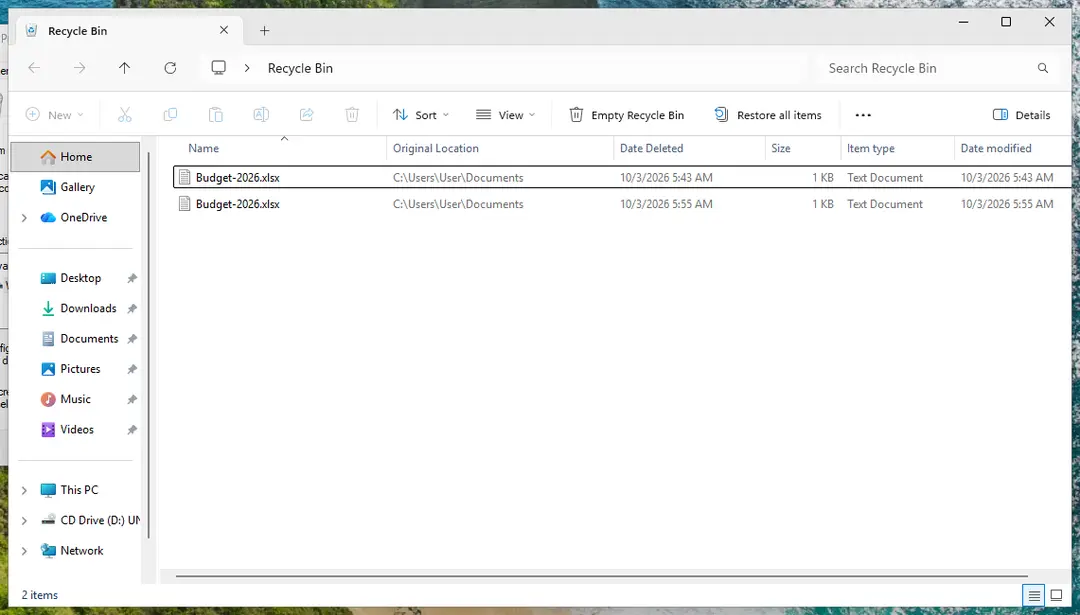
The Recycle Bin shows each file's original location and when it was deleted. Screenshot: Windows 11 26H2 Find the file
Select the Date Deleted column header to put the most recently deleted files on top, or type part of the name in the Search Recycle Bin box. Two files with the same name are separate deletions: check the date.
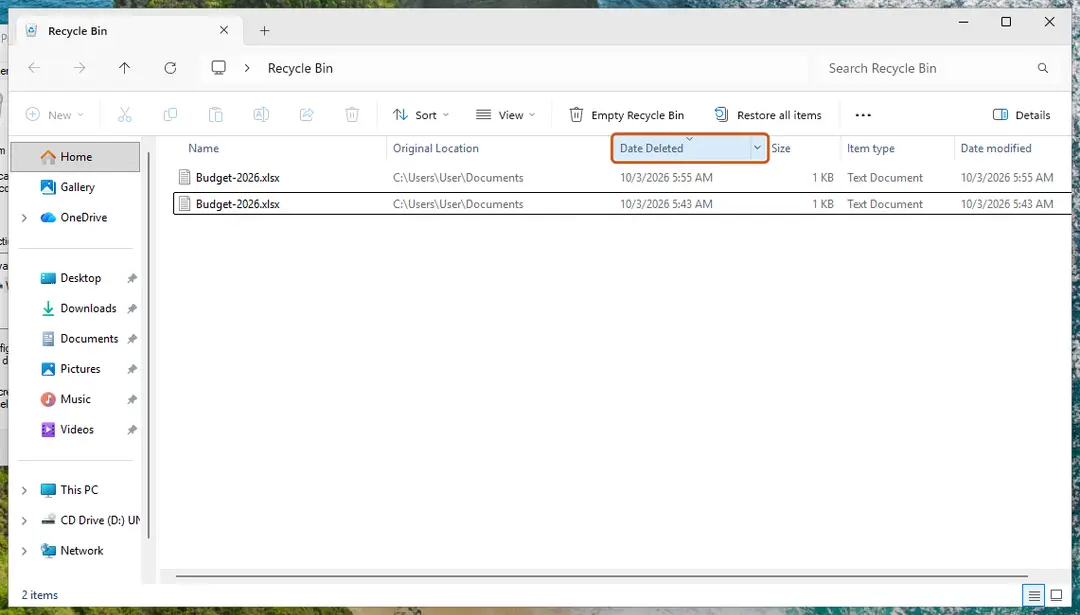
Sort by Date Deleted to see the latest deletions first. Screenshot: Windows 11 26H2 Restore it
Right-click the file and select Restore. It goes back to the folder shown under Original Location. Do not use Restore all items unless you want every file back.
If it is not in the Recycle Bin, check OneDrive
If the file was in a folder synced with OneDrive (Desktop, Documents and Pictures often are), it can be in the OneDrive recycle bin online: Restore deleted or older files in OneDrive.
Then look for an earlier version
Right-click the folder that held the file and look for an earlier version of it: Restore an earlier version of a file or folder. This works only if File History or restore points with file copies were on before the deletion.
As a last step, try Windows File Recovery
Microsoft's free command-line tool searches the drive for deleted data. Recovered files must be saved to a different drive. See Recover deleted files with Windows File Recovery.
Why a file is not in the Recycle Bin or Trash
- It was deleted with Shift+Delete, from the command line, or by an app that deletes directly.
- It was on a USB flash drive or memory card: these usually have no Recycle Bin.
- The Recycle Bin was emptied, or emptied itself.
Before you pay for recovery software
No tool can promise results. A deleted file can be recovered only while its space on the disk has not been reused, so the less you use the drive, the better the chances. On an SSD with TRIM the space is often cleared soon after deletion. In our own test on Windows 11, Windows File Recovery did not get back a very small text file in either regular or extensive mode, because such files are stored differently.
If the files matter a lot (business records, the only copy of photos), stop using the drive and contact a data recovery service before trying anything else.
So it does not happen again
Set up a backup now: Back up your files (Windows Backup, File History, Time Machine). On our Windows 11 26H2 test PC the classic File History was no longer present; the Windows Backup app (which saves to OneDrive) was the built-in option.
Used in 2 guides
Sources
- Microsoft Support: Restore files deleted from your OneDrive (read Oct 3, 2026)
- Microsoft Support: Windows File Recovery (read Oct 3, 2026)